
If for any reason you want to slette firmakonto i easy.jobs. you can do it easily from your dashboard with 1 click. This will remove your company permanently from easy.jobs and you will no longer have access to company logos, images, contributors, pipelines, and other information.
Follow these instructions below to delete your easy.jobs company account.
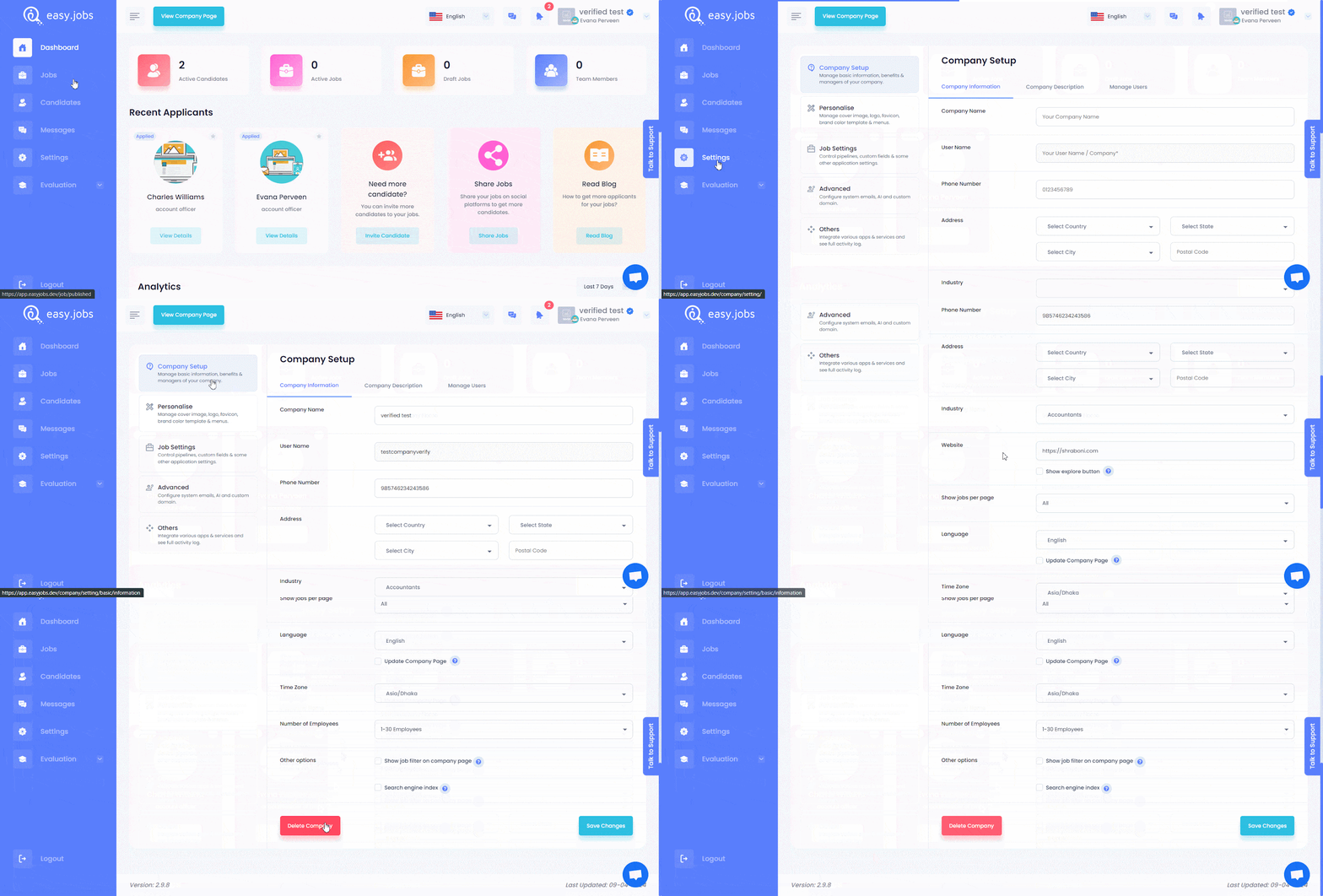
Trinn 1: Logg inn på din easy.jobs account and click on the ‘Settings’ tab from your dashboard. Afterward, navigate to ‘Company Setup’ → ‘Company Information’ scroll down & click on ‘Delete Company’ button as shown below.
Steg 2: After pressing on the ‘Delete Company’ button, a confirmation popup will appear on the screen. Here you can see all the information that will also be permanently deleted if you delete your company. Type ‘delete’ in the input field and then press on the 'Ja' button to confirm.

This is how you can delete company account in easy.jobs.
Hvis du trenger hjelp, må du gjerne kontakt oss eller bli med på vår Facebook-fellesskapet for å få kontakt med andre bedriftseiere som deg selv.