Most hiring teams do not lose great candidates to better job offers. They lose them to chaos, an email that slipped through the cracks, a follow-up that never happened, a candidate left waiting in silence for three weeks while two managers debated who was supposed to schedule the next interview.
A structured recruitment pipeline fixes all of that. Not by adding complexity but by giving every candidate a clear position in your process and giving your team a shared view of exactly where hiring stands at any moment.
This guide covers everything you need to know: what a recruitment pipeline actually is, how to design the right stages for your roles, how to manage candidates through it day-to-day, and how tools like easy.jobs make the whole process visual, collaborative and fast. Whether you are building your first pipeline or fixing one that is breaking under volume, you will leave with a clear plan.
TL;DR: Recruitment Pipeline Explained
- A recruitment pipeline is a structured, stage-based system to track and manage candidates throughout the hiring process
- It gives hiring teams a visual overview of candidate progress, helping identify bottlenecks and take faster action
- Common recruitment pipeline stages include: Applied, Screening, Interview, Assessment, Offer and Hired/Rejected
- Using a recruitment pipeline improves time-to-hire, candidate experience and team collaboration
- Assigning clear stage ownership and setting stage time limits prevents delays and missed follow-ups
- Regularly reviewing pipeline data helps you optimize your hiring process and reduce candidate drop-off
- A tool like easy.jobs provides a visual recruitment pipeline with automation and real-time collaboration
What Is a Recruitment Pipeline?
A recruitment pipeline is a structured, stage-by-stage system for tracking candidates as they move through your hiring process from the moment they apply to the moment you make a decision.
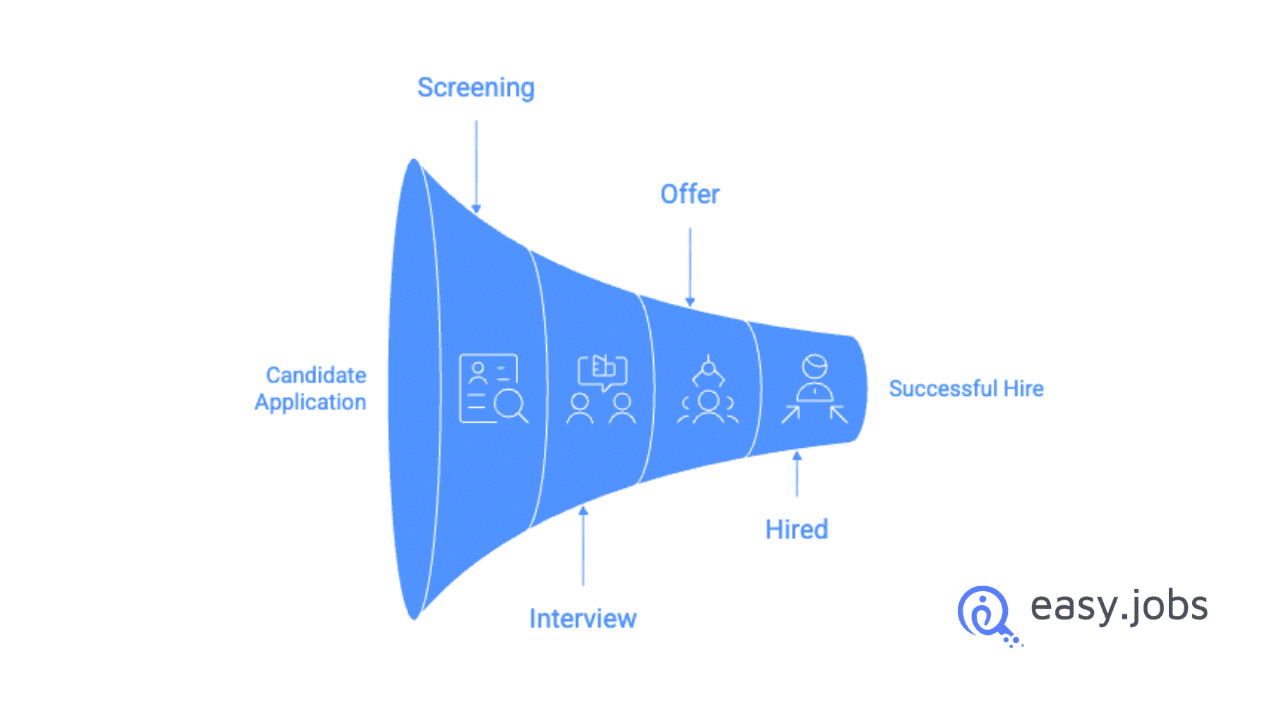
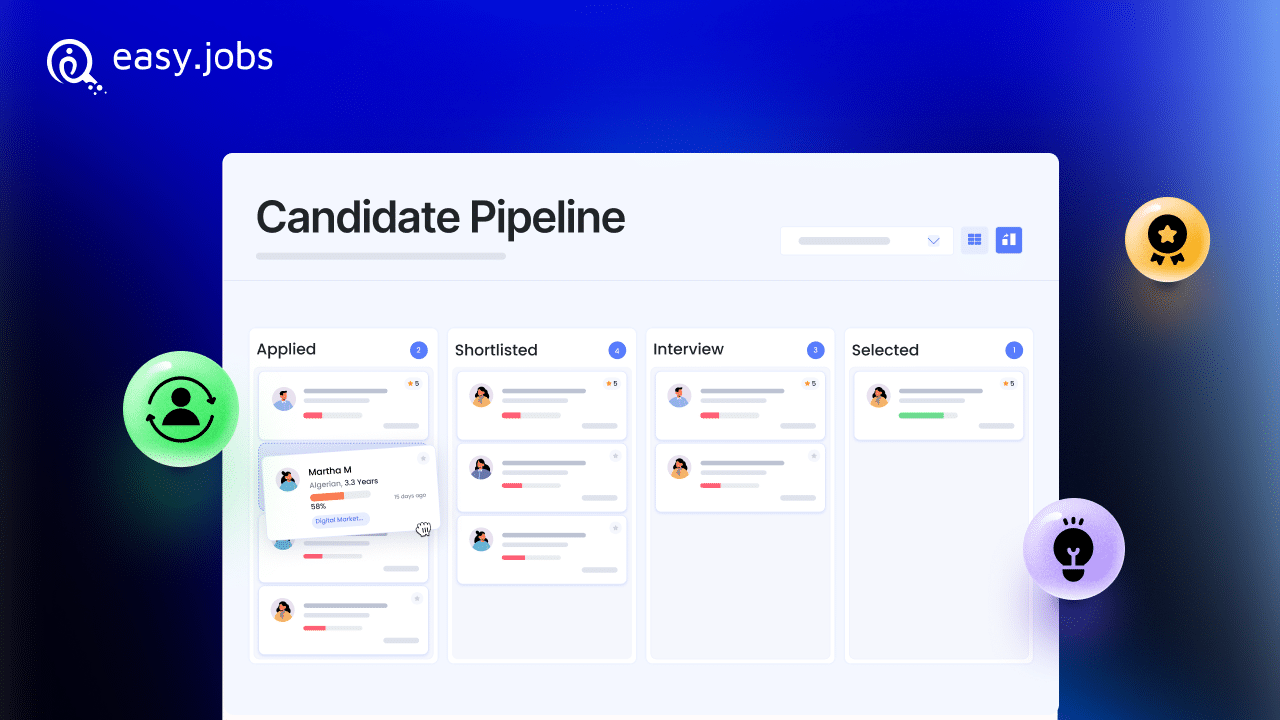
Think of it less like a spreadsheet and more like a visual board. Each candidate is a card. Each column is a stage: Applied, Screening, Interview, Offer, Hired. As candidates progress (or do not), they move across the board. At any point, you and your team can see exactly how many candidates are in each stage, who needs action and where people are getting stuck.
This is different from two things people often confuse it with:
Talent pipeline refers to proactively building a pool of future candidates. People you have not hired yet but plan to reach out to when a role opens. It is a long-term sourcing strategy. A recruitment pipeline, by contrast, is about managing active applicants for a live, open job right now.
A basic ATS list shows you candidates in a flat list with a status field. A recruitment pipeline shows you the same information as a visual workflow. Which makes it dramatically easier to spot bottlenecks, prioritize action and collaborate with your hiring team.
📌 For a deeper look at long-term talent strategy, read our guide on Talent Pipeline Management in Recruitment.
Why Your Hiring Process Needs a Recruitment Pipeline
Without a structured pipeline, hiring tends to look like this: applications come in, someone reviews them eventually, promising candidates get a first interview and then things get foggy. Who is following up? Has the hiring manager seen this person yet? Did we send the assessment? No one is quite sure and by the time anyone checks, the candidate has accepted another offer.
A recruitment pipeline eliminates that ambiguity by giving every candidate a clearly defined status and making that status visible to everyone involved in the hire. Here is what that translates to in practice:
Faster time-to-hire. When your team can see exactly where every candidate is, delays get caught immediately. A candidate sitting in “Interview Scheduled” for eight days is a visible problem, not a hidden one.
Better candidate experience. Candidates notice when they go dark. A pipeline with stage-based communication triggers means candidates hear from you at every transition without your team having to remember to send individual emails.
Real alignment between HR and Hiring Managers. HR manages the process; Hiring Managers own the decision. A shared pipeline board means both sides are working from the same picture rather than sending status-check emails back and forth.
Drop-off visibility. If 40 candidates applied and only 3 made it past screening, you should know that and know why. A pipeline makes that pattern visible so you can fix the problem upstream, not after the fact.
Team accountability. Each stage can have a clear owner. When everyone knows who’s responsible for what, action happens faster and nothing slips.
📌 For more on how strong candidate relationships improve hiring outcomes, see our guide on Candidate Relationship Management.
Recruitment Pipeline Stages Explained
There is no universal pipeline that works for every company and every role. But there are standard stages that most effective pipelines are built around and understanding them helps you customize intelligently rather than guessing.
The Core Stages
1. Applied / New
Every candidate who submits an application lands here. This is your raw inbox- unreviewed, unscreened. The goal of this stage is to make sure no application sits here unacknowledged. An auto-acknowledgement email sent from this stage sets the tone immediately.
2. Screening
This is where you do initial qualification: resume review, a quick phone screen, or a short screening questionnaire. Most pipelines see the highest drop-off here, which is normal. The goal is not to move everyone forward; it is to identify who is worth investing more time in.
3. Interview
Depending on your process, this could be a single stage or broken into multiple rounds: First Interview, Second Interview, Panel Interview. Be intentional here: the more rounds, the more friction for candidates. Only add a round if it genuinely adds information you did not have before.
4. Assessment / Task
Not every role needs this, but for technical, creative, or analytical positions, a skills assessment or task-based round often tells you more than an interview alone. Place this after at least one interview. Do not send assessments to unscreened applicants.
5. Offer
Candidates in this stage have been selected. You are in active negotiation or offer delivery mode. Keep this stage as short as possible; extended offer stages are where candidates get cold or get poached.
6. Hired / Rejected
The final disposition. Both outcomes deserve a stage. Rejected candidates should be closed properly with a notification, not just forgotten in a previous stage. This matters for your employer brand.
A Few Important Design Principles
Customize per job. A pipeline for hiring a frontend developer looks very different from one for hiring an account manager. The stages, the assessment type and the number of interview rounds. All of these should reflect the specific role, not a generic template.
Name stages with action in mind. “Interview” is a status. “Schedule Interview” is an action. The latter tells your team what needs to happen next, which reduces decision fatigue.
Do not over-engineer it. More than seven or eight stages in a single pipeline is usually a sign that you are tracking process overhead rather than meaningful hiring milestones. If two stages always happen within 24 hours of each other, consider merging them.
📌 To see exactly how to set up and manage pipeline stages in easy.jobs, see our step-by-step guide: How to Manage Pipeline in easy.jobs.
How to Build a Recruitment Pipeline from Scratch
Building your pipeline before candidates start flowing in, not during. It is the difference between a system that works and one that breaks at volume. Here’s how to do it right.
Step 1: Define the Stages for This Specific Job
Start with the role, not a template. Ask yourself: What are the actual decision points in this hire? What would make me confident enough to move someone from one stage to the next? Map those decision points- those are your stages.
For a customer support role: Applied → Screening → Interview → Offer → Hired.
For a senior engineering role: Applied → Screening → Technical Interview → Take-Home Assessment → Culture Interview → Offer → Hired.
Both are valid pipelines. The difference is in what the role requires.
Step 2: Assign Ownership Per Stage
Every stage should have a clear owner. The person responsible for reviewing candidates in that stage and deciding who moves forward. This is not always the same person throughout the pipeline. HR might own Screening; the Hiring Manager owns the Interview stage; HR re-engages for Offer.
Map this before you launch. Ambiguity about ownership is the number one reason candidates stall in pipelines.
Step 3: Set Up Notification & Communication Triggers
Decide what happens when a candidate enters each stage. Some should trigger an automatic email. An acknowledgment at Applied, a scheduling link at Interview, an outcome message at Hired or Rejected. Others might just trigger an internal notification to the stage owner.
Setting these up in advance means your communication happens consistently, without manual effort.
📌 See exactly how to configure stage-based emails in easy.jobs: How to Configure Candidate Pipeline Change Email in easy.jobs.
Step 4: Activate the Pipeline on Your Job Posting
In easy.jobs, your pipeline is tied directly to a published job. Once the pipeline is configured and the job is live, every incoming application automatically enters the first stage. You do not need to import or manually add candidates.
Step 5: Run a Dry Test Before Going Live
Before your first real application arrives, walk a test candidate through the pipeline manually. Move them through each stage. Check that notifications fire correctly, that the right team members are seeing updates, and that the stage names make sense to everyone who will be using the board.
Fixing these things before launch takes 20 minutes. Fixing them after 100 applications have already come in is a much bigger problem.
📌 For the full walkthrough of managing candidates day-to-day once your pipeline is live: How to Manage Candidates from easy.jobs Job Pipeline Board.
How to Manage Candidates Through Your Pipeline
Building the pipeline is the setup. Managing it is the ongoing work and this is where most teams either develop a rhythm that makes hiring feel effortless or fall back into the chaos they were trying to escape.
For HR Managers & Recruiters
Your primary job in the pipeline is process ownership. That means:
- Reviewing new applications daily. Candidates in the first stage should move or be closed within 48 hours. Let applications pile up unreviewed and you will create a backlog that’s demoralizing to work through.
- Keeping the pipeline clean. Candidates who are clearly not a fit should not sit in Screening for two weeks. Close them promptly, trigger a polite rejection and keep your board focused on active candidates.
- Monitoring for bottlenecks. If 30 candidates are stacked in an Interview and none have moved in a week, that is a signal, either the Hiring Manager is overwhelmed, or the interview scheduling process is broken. A visual pipeline makes this pattern impossible to miss.
- Standardizing across multiple jobs. If you are managing pipelines for five open roles simultaneously, consistent stage naming and ownership conventions make it much easier to context-switch without making errors.
For Hiring Managers
Your relationship with the pipeline is different. You are not managing the whole process. You are responsible for the stages you own, typically the interview and assessment rounds.
- Act on candidates in your stage quickly. Every day a candidate sits waiting for your review is a day they are also interviewing elsewhere. Aim to review and respond within 24–48 hours of a candidate entering your stage.
- Use the pipeline as a shared language with HR. Instead of “where are we on the marketing hire?” – look at the pipeline board. The answer is there.
- Add notes and context. Most pipeline tools allow you to leave comments or feedback on individual candidates. Use this. Your notes help HR manage the communication and help the team make a consistent decision at the offer stage.
Handling High-Volume Roles
For roles that attract hundreds of applications: entry-level positions, high-demand technical roles, managing candidates one by one does not scale. Use:
- Bulk actions to move or reject multiple candidates at once after an initial screening pass
- Filters to sort by application date, stage time, or other criteria so you are always working the most urgent cases first
- Screening questions at the application stage to pre-qualify candidates before they even enter your pipeline, reducing the noise that hits your team
Recruitment Pipeline Best Practices
A well-built pipeline is only as good as the habits your team builds around it. These practices separate hiring teams that consistently close roles fast from ones that perpetually feel behind.
Review Pipeline Health Weekly, Not Reactively.
Set a standing 15-minute weekly check with your hiring team. Look at each stage: how many candidates, how long have they been there, what is the next action? This one habit prevents most pipeline failures before they happen.
Set Stage Time Limits.
Define the maximum time a candidate should sit in any single stage before someone intervenes. A useful baseline: no candidate should stay in any stage longer than five business days without an update or a decision. Build this expectation into your process explicitly.
Always Close The Loop on Both Outcomes.
Candidates who are rejected deserve a notification just as much as candidates who are advanced. Not closing rejected candidates properly is the single biggest drain on the employer brand that most teams do not think about. It takes seconds in a well-configured pipeline.
Do Not Add Stages for Reporting Purposes.
It is tempting to add a “Reference Check” stage or a “Background Verification” stage to your visual pipeline. Resist this unless it is a true hiring decision point. Stages that exist for tracking overhead rather than candidate action clutter your board and slow your team down.
Keep the Pipeline Honest.
If a candidate has verbally declined but is still sitting in your Offer stage, close them. An accurate pipeline is only useful if it reflects reality. Stale data is worse than no data.
📌 For proven frameworks and strategies to manage your talent pipeline over the long term, read: Proven Strategies for Talent Pipeline Management in Recruitment.
📌 For a deep dive into managing candidate relationships across your pipeline: Candidate Relationship Management: Everything You Need to Know.
Recruitment Pipeline vs. Spreadsheet vs. Basic ATS
If you are still managing candidates in a spreadsheet or a flat list in an ATS with no visual workflow. Here is the honest comparison:
| Spreadsheet | Basic ATS List | Visual Recruitment Pipeline | |
| Stage visibility at a glance | ❌ | Partial | ✅ |
| Team collaboration & shared view | ❌ | Partial | ✅ |
| Per-job stage customization | ❌ | ❌ | ✅ |
| Candidate drop-off tracking | ❌ | ❌ | ✅ |
| Automated stage-based notifications | ❌ | Partial | ✅ |
| Bottleneck identification | ❌ | ❌ | ✅ |
| Hiring Manager + HR alignment | ❌ | Partial | ✅ |
| Scales with hiring volume | ❌ | Partial | ✅ |
When a Spreadsheet Is Still Fine
If your company hires one or two people per year, the same role each time, with a simple two-step process, a spreadsheet probably is not killing you. The overhead of setting up a pipeline may not be worth it at that volume.
When You Need a Pipeline
If any of these are true, you have outgrown your spreadsheet:
- You are managing more than one open role at a time
- Multiple people are involved in the hiring decision
- Candidates frequently fall through the cracks or go cold
- You do not have a clear answer to “where is everyone in the process?” at any given moment
- You are hiring frequently enough that consistency matters
At that point, the question isn’t whether to use a pipeline. It is which tool to use.
How easy.jobs Candidate Pipeline Works
easy.jobs includes a built-in visual candidate pipeline directly tied to each job you post. It is not an add-on or a separate module. When you publish a job, a pipeline is available immediately, ready to be configured for that specific role. Here is what makes it built for how hiring teams actually work:
Visual board, per job. Each job has its own pipeline board. Candidates appear as cards, stages appear as columns and moving candidates is as simple as dragging a card from one column to the next. If you are managing five open roles, each has its own independent board. So your sales pipeline and your engineering pipeline do not interfere with each other.
Fully customizable stages. The default stages are a starting point, not a constraint. You can add, rename, reorder or remove stages to match exactly what your hiring process for that role requires. A startup hiring its first engineer and an enterprise team hiring its fiftieth can both configure the pipeline to fit.
Stage-based email notifications. Every time a candidate moves to a new stage, you can trigger an automatic email. The content, tone, and timing of those emails is configurable. Candidates stay informed without your team having to manually send individual messages for every transition.
Multi-user access for hiring teams. HR Managers and Hiring Managers can both access the same pipeline board. Permissions are scoped so each role sees and acts on what is relevant to them. Everyone works from the same source of truth.
No data entry required. Candidates who apply to your easy.jobs job posting automatically appear in the first stage of the pipeline. There’s no import step, no manual entry, no syncing between systems.
Setting Up Your Pipeline in easy.jobs: A Quick Start
If you are ready to configure your first pipeline in easy.jobs, the process follows the steps we outlined earlier, but the platform makes each one faster than doing it manually.
- Publish or select an existing job in your easy.jobs dashboard
- Navigate to the Pipeline section for that job
- Add, rename, or reorder your stages to match your hiring process
- Configure stage-based notification emails for candidate-facing transitions
- Invite your hiring team members and assign stage ownership
- Start reviewing incoming applications directly from the pipeline board
📌 Full step-by-step setup guide: How to Manage Pipeline in easy.jobs
📌 Configuring notification emails: How to Configure Candidate Pipeline Change Email in easy.jobs
📌 Day-to-day candidate management: How to Manage Candidates From easy.jobs Job Pipeline Board
Frequently Asked Questions – FAQ’s on Recruitment Pipeline
What is a Recruitment Pipeline?
A recruitment pipeline is a structured, stage-by-stage system for tracking and managing candidates as they move through an active hiring process. Unlike a talent pipeline, which is about building future candidate pools. A recruitment pipeline manages candidates who have already applied to a specific open job.
How Many Stages Should a Recruitment Pipeline Have?
Most effective pipelines have between four and seven stages. Fewer than four often means decision points are being skipped or collapsed; more than eight typically signals that you are tracking process overhead rather than meaningful hiring milestones. The right number depends entirely on your role and your process.
What is the Difference Between a Recruitment Pipeline And a Talent Pipeline?
A recruitment pipeline manages active applicants for a live, open job right now. A talent pipeline is a proactive strategy for building a pool of candidates you have not hired yet. People you are nurturing for roles that may open in the future. They serve different purposes and sit at different stages of your broader hiring strategy.
Can Multiple Team Members Manage the Same Pipeline?
Yes. In easy.jobs, multiple users can access the same pipeline board with appropriate permissions. HR Managers and Hiring Managers can collaborate on the same candidate pool without stepping on each other. Each seeing and acting on the stages relevant to their role.
How Do I Know Where Candidates Are Dropping Off in My Pipeline?
A visual pipeline board makes drop-off visible at a glance. If 80 candidates are in Screening and only 5 made it to the Interview, you can see that immediately. Over time, tracking stage-to-stage conversion rates tells you where your process has friction. So you can fix the upstream problem rather than reacting to the outcome.
How Do I Track Candidates Across Multiple Jobs at the Same Time?
In easy.jobs, each published job has its own independent pipeline. You can switch between jobs and view each pipeline board separately. So your hiring across five roles stays organized without any cross-contamination between candidate pools.
What Happens to Rejected Candidates?
Rejected candidates should be moved to a closed or rejected stage, not left stranded in a mid-process stage. A well-configured pipeline triggers an automatic notification to the candidate when this happens, closing the loop professionally. This is important for candidate experience and your employer brand.
Do I Need to Manually Add Candidates to the Pipeline?
No. In easy.jobs, candidates who apply to a published job automatically appear in the first stage of your pipeline. There is no import step or manual entry required.
Build a Recruitment Pipeline That Actually Works
A recruitment pipeline is not a luxury for large HR teams with complex tech stacks. It is the foundational system that lets any hiring team, regardless of size. Stay organized, move fast and treat candidates like people rather than status fields in a spreadsheet.
The core principles are simple: define meaningful stages for each specific role, assign clear ownership at every step, set up communication that keeps candidates informed and review your pipeline health regularly enough to catch bottlenecks before they become lost hires.
The difference between a pipeline that works and one that doesn’t is usually not the tool, it is the intentionality behind the setup.
If you are ready to see what a fully visual, customizable recruitment pipeline looks like in practice, easy.jobs builds one into every job you post, no integration, no setup fee, no spreadsheet required.
If you found this guide helpful, subscribe to our blog for more practical hiring insights and step-by-step recruitment strategies. Join our Facebook Community to connect with recruiters, share experiences and learn how others are building smarter recruitment pipelines.