Karyawan baru memutuskan apakah mereka telah membuat pilihan yang tepat jauh sebelum mereka menyelesaikan proyek pertama mereka. Namun, sebagian besar proses orientasi masih berjalan dengan daftar periksa manual, email yang tersebar, dan tumpukan dokumen yang membebani HR dan karyawan baru. Hasilnya dapat diprediksi. Menurut Gallup, hanya Sebanyak 121.300 karyawan sangat setuju bahwa organisasi mereka melakukan pekerjaan yang sangat baik dalam hal orientasi karyawan baru..
Otomatisasi proses orientasi karyawan mengatasi akar permasalahan. Ini mengubah proses manual yang rumit menjadi alur kerja yang andal di mana satu tindakan memicu tindakan berikutnya, sehingga tidak ada yang menunggu di kotak masuk hingga seseorang mengingatnya. Otomatisasi sejati bukan sekadar memindahkan formulir Anda ke online. Ini adalah alur yang terhubung di mana penawaran yang ditandatangani, tanggal mulai yang dikonfirmasi, atau formulir yang telah diisi secara otomatis memicu langkah selanjutnya.
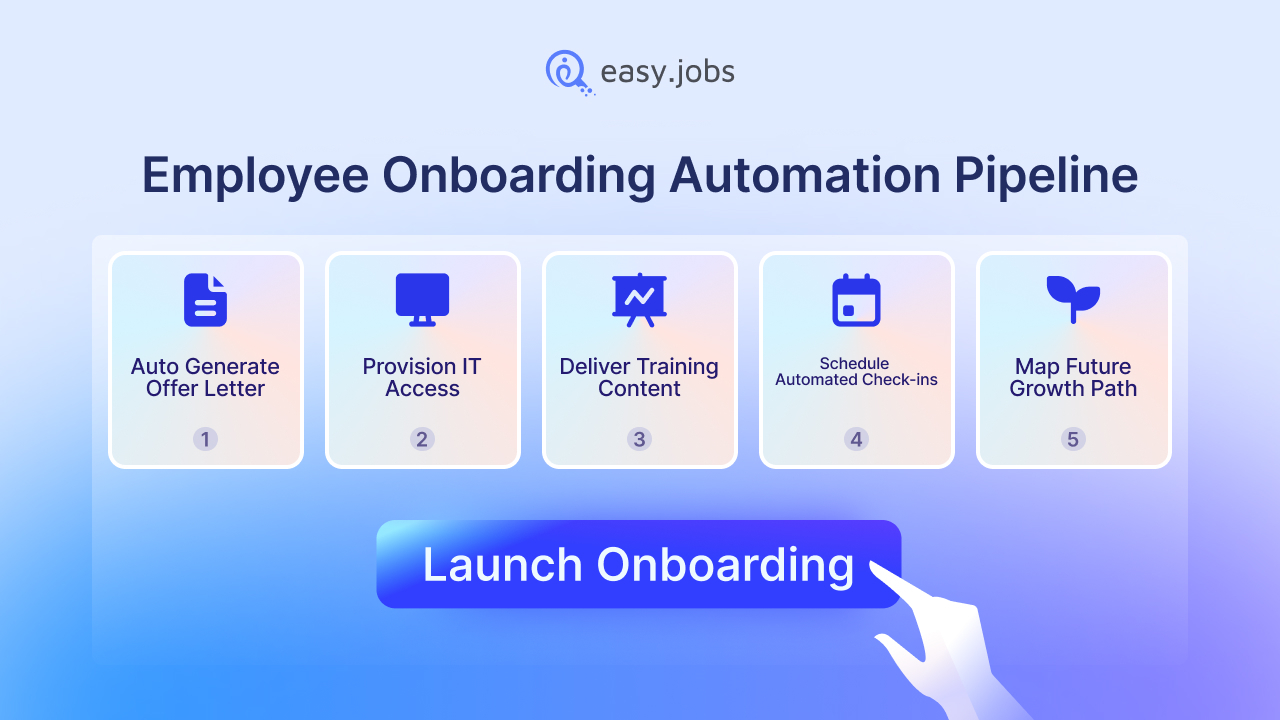
Panduan ini akan memandu Anda membangun alur kerja otomatisasi onboarding pertama Anda dalam lima langkah praktis, mulai dari memetakan alur kerja Anda saat ini hingga menjadwalkan pengecekan otomatis 30-60-90 hari. Setiap langkah dirancang untuk tim SDM yang ingin mengurangi beban kerja administratif, melindungi pengalaman karyawan baru, dan mempertahankan karyawan yang baik setelah 90 hari pertama yang kritis. Tidak diperlukan gelar teknik, hanya proses yang jelas dan sistem onboarding yang tepat.
Ringkasan: Luncurkan Alur Otomatisasi Orientasi Karyawan
Otomatisasi proses orientasi karyawan mengubah proses manual yang penuh dengan dokumen menjadi alur kerja yang terhubung. Satu tindakan secara otomatis memicu tindakan berikutnya, mulai dari penawaran kerja yang ditandatangani hingga pengecekan 90 hari. Jika dilakukan dengan baik, hal ini mengurangi pekerjaan administrasi SDM, mempercepat waktu produktivitas, dan meningkatkan retensi karyawan sejak dini.
Bangunlah dalam 5 langkah:
- Petakan alur kerja Anda saat iniIdentifikasi titik-titik gesekan (tiket TI yang tertunda, penyerahan tugas secara manual) dan rancang jalur ideal dari penawaran hingga Hari ke-90.
- Pilih perangkat lunak yang terhubungPilihlah alat onboarding yang terintegrasi dengan ATS dan HRIS Anda sehingga data tidak perlu dimasukkan ulang.
- Otomatiskan pra-boarding: Surat penawaran digital, tanda tangan elektronik, dan rangkaian sambutan terjadwal untuk menjaga keterlibatan karyawan baru sebelum hari pertama bekerja.
- Penyediaan TI dan tugas-tugas hari pertama.Siapkan akses tanpa sentuhan (zero-touch access) sehingga akun dan alat sudah siap sebelum karyawan tiba, dan tetapkan pelatihan berdasarkan peran secara otomatis.
- Jadwalkan check-in 30-60-90 haris: Otomatiskan survei berkala dan pertemuan empat mata dengan manajer untuk mendeteksi hambatan dan mendukung karyawan baru hingga melewati minggu pertama mereka.
Otomatisasi tidak menghilangkan sentuhan manusia; otomatisasi menghilangkan kesibukan administratif, sehingga tim Anda memiliki lebih banyak waktu untuk momen-momen yang benar-benar membuat karyawan baru merasa diterima.
Berapakah ROI (Return on Investment) sebenarnya dari proses onboarding otomatis?
Proses orientasi karyawan otomatis akan menguntungkan Anda dalam dua hal: waktu yang dihemat tim Anda dan karyawan baru yang berhasil dipertahankan. Para profesional SDM yang mengadopsi otomatisasi orientasi karyawan melaporkan peningkatan jumlah karyawan baru yang berhasil dipertahankan. Pengurangan waktu orientasi sebesar 53% dan pengurangan waktu yang dihabiskan untuk tugas administratif sebesar 43%.. Beberapa laporan menyebutkan penghematan lebih dari 1.441.800 dalam satu tahun.
Mengurangi Beban Administrasi
Proses orientasi manual sebagian besar berupa pengurusan dokumen. 58% dari program orientasi berfokus pada proses dan formulir, dengan karyawan baru diharapkan menyelesaikan lebih dari 50 tugas administratif.. Setiap tugas tersebut berpotensi untuk diotomatisasi.
Saat tawaran pekerjaan ditandatangani, alur kerja otomatis dapat menghasilkan kontrak kerja, meminta detail pajak dan perbankan, mendaftarkan karyawan ke dalam program tunjangan, dan menyimpan setiap formulir yang telah diisi tanpa perlu memasukkan data secara manual. Di situlah letaknya Pengurangan pekerjaan administratif 43% Berasal dari mana. Data yang dimasukkan sekali akan mengalir ke mana pun dibutuhkan.
Meningkatkan Tingkat Retensi Awal
Beberapa minggu pertama menentukan siapa yang bertahan. Perusahaan-perusahaan tersebut memiliki perkiraan 44 hari untuk menentukan nasib karyawan baru dan 441.300 karyawan mengaku ragu-ragu dalam minggu pertama mereka.. Proses start yang lancar dan otomatis secara langsung menepis keraguan awal tersebut.
Biaya akibat kesalahan sangat mahal. Di antara karyawan baru yang merasa kurang terlatih karena proses orientasi yang buruk, 80% berencana untuk segera pergi, dibandingkan dengan hanya 7% dari mereka yang merasa terlatih dengan baik.. Menggantinya juga mahal, diperkirakan menelan biaya enam hingga sembilan bulan gaji karyawan. Otomatisasi melindungi retensi dengan memastikan setiap karyawan baru menerima permulaan yang lengkap, ramah, dan teratur.
| Apa saja biaya yang harus ditanggung oleh proses onboarding yang buruk? | Angka |
|---|---|
| Karyawan baru yang ragu-ragu di minggu pertama | 44% |
| Karyawan baru yang kurang terlatih dan berencana untuk segera berhenti. | 80% |
| Karyawan baru yang terlatih dengan baik dan berencana untuk segera berhenti. | 7% |
| Biaya untuk mengganti seorang karyawan | Gaji 6-9 bulan |
| Karyawan yang sangat setuju bahwa proses orientasi karyawan baru itu hebat. | 12% |
Langkah 1: Bagaimana Anda Memetakan Alur Kerja Onboarding Anda Saat Ini?
Anda tidak dapat mengotomatiskan proses yang belum Anda petakan. Mulailah dengan mendokumentasikan setiap langkah yang dilalui karyawan baru hari ini, karena Sebanyak 58% program orientasi karyawan dibangun berdasarkan dokumen-dokumen yang tidak terhubung, bukan berdasarkan alur kerja yang dirancang dengan baik.. Pemetaan menunjukkan secara tepat di mana otomatisasi akan paling membantu.
Mengidentifikasi Titik-Titik Gesekan yang Ada
Gesekan biasanya tersembunyi dalam proses transisi. Karyawan baru menyebutkan frustrasi terbesar mereka di hari pertama sebagai berikut: kurangnya akses terhadap alat-alat penting (58%) dan masalah teknologi seperti komputer yang belum dikonfigurasi (51%). Inilah celah-celah di mana sebuah tugas terlepas dari rangkaian email dan terhenti begitu saja.
Carilah hambatan klasik: persetujuan penawaran yang menunggu tanda tangan, tiket TI yang diajukan terlambat, formulir yang dikirim bolak-balik melalui email, dan tanggal mulai yang tiba sebelum siapa pun siap. Setiap penundaan adalah tempat di mana pemicu dapat menggantikan pengingat. Tandai setiap titik di mana seseorang saat ini harus mengejar orang lain.
Dokumentasikan Perjalanan Ideal
Selanjutnya, gambarkan versi tanpa hambatan di papan tulis. Petakan jalur ideal dari penawaran yang ditandatangani hingga hari ke-90, dengan mengingat bahwa... 701.300 dari karyawan baru memutuskan apakah suatu pekerjaan cocok untuk mereka dalam bulan pertama mereka bekerja.. Perjalanan ideal Anda seharusnya mengutamakan kejelasan dan koneksi sejak awal.
Bagi alur kerja menjadi empat tahap: pra-orientasi dari penawaran hingga hari pertama, hari pertama, minggu pertama, dan periode 30-60-90 hari. Untuk setiap tahap, catat siapa yang bertanggung jawab, apa yang diterima karyawan baru, dan tindakan apa yang memulai langkah selanjutnya. Peta tahapan ini menjadi cetak biru yang akan diikuti oleh alur otomatisasi Anda.
Tim yang memetakan proses orientasi sebagai satu perjalanan tunggal dari penawaran hingga hari ke-90, alih-alih sebagai daftar periksa terpisah untuk HR, IT, dan manajer, secara konsisten menemukan hasil yang sama: proses peralihan antar departemen, bukan tugas-tugas itu sendiri, adalah tempat karyawan baru tersesat.
Langkah 2: Bagaimana Anda Mengevaluasi dan Memilih Perangkat Lunak Orientasi Karyawan Baru?
Pilihlah perangkat lunak orientasi karyawan baru yang mengotomatiskan seluruh proses di satu tempat, bukan alat khusus yang hanya menyelesaikan satu langkah. Adopsinya semakin cepat. 451.300 profesional SDM sudah menggunakan orientasi berbasis AI dan 251.300 lainnya berencana untuk menambahkannya, sementara 46% organisasi memperkirakan akan menggunakan AI dalam SDM pada tahun 2026.
Apa Saja Fitur-Fitur yang Wajib Ada dalam Sistem Onboarding?
Perangkat lunak onboarding terbaik memiliki satu ciri khas. Perangkat lunak ini menghubungkan pencarian kandidat, perekrutan, dan onboarding sehingga data tidak perlu dimasukkan ulang. Koneksi ini penting karena 651.000 profesional SDM percaya bahwa AI dalam onboarding akan meningkatkan retensi karyawan. Gunakan daftar periksa di bawah ini untuk membedakan platform lengkap dari alat yang hanya memiliki satu tujuan.
| Fitur yang wajib dimiliki | Mengapa ini penting |
|---|---|
| Alur kerja dokumen otomatis dan tanda tangan digital | Menghilangkan jejak kertas dan memperlancar proses formulir penawaran dan kepatuhan. |
| Portal layanan mandiri untuk karyawan baru | Memungkinkan karyawan menyelesaikan tugas sebelum hari pertama |
| Otomatisasi tugas berbasis pemicu | Memicu langkah selanjutnya tepat saat langkah sebelumnya selesai. |
| Impor Kandidat | Memindahkan kandidat yang diterima dan data mereka tanpa perlu memasukkan data ulang secara manual. |
| Merek white-label | Menambahkan logo, warna, dan domain Anda untuk pengalaman profesional dan sesuai merek. |
| Integrasi ATS dan HRIS | Menghubungkan data perekrutan dengan penggajian, tunjangan, dan penyediaan TI. |
| Analisis orientasi karyawan baru | Menunjukkan di mana karyawan baru mengalami hambatan sehingga Anda dapat meningkatkan alur kerja. |
Mengintegrasikan dengan Tumpukan Teknologi yang Sudah Ada
Otomatisasi onboarding hanya berfungsi jika sistem Anda saling berkomunikasi. Setiap proses serah terima yang terputus adalah tempat data dimasukkan ulang dan kesalahan dapat terjadi, itulah mengapa integrasi merupakan persyaratan yang mutlak dan bukan sekadar fitur tambahan. Dua koneksi adalah yang terpenting.
Sistem Pelacakan Pelamar (ATS)
Sistem pelacakan pelamar Anda sudah menyimpan semua informasi yang Anda peroleh tentang kandidat selama proses perekrutan. ATS yang terhubung akan mengirimkan data tersebut langsung ke catatan karyawan begitu tawaran diterima, sehingga proses orientasi dimulai dengan profil lengkap, bukan formulir kosong. Sebagai platform perekrutan dan ATS berbasis AI, easy.jobs dirancang untuk membawa data kandidat hingga proses orientasi tanpa perlu memasukkan data ulang.
Sistem Informasi Sumber Daya Manusia (SDM)
Sistem HRIS memusatkan penggajian, tunjangan, dan catatan inti karyawan. Menghubungkan sistem orientasi karyawan baru ke HRIS berarti detail karyawan baru, yang dimasukkan sekali selama orientasi, akan secara otomatis mengisi penggajian dan tunjangan. Sumber data tunggal inilah yang menghilangkan entri data ganda yang ditakuti baik oleh karyawan baru maupun tim HR.
Langkah 3: Bagaimana Cara Anda Mengatur Pemicu Pra-Naik Pesawat?
Pra-orientasi adalah periode antara penandatanganan tawaran dan hari pertama kerja. Periode ini lebih berisiko daripada yang diasumsikan sebagian besar tim. Inilah saat keraguan mulai muncul: setengah dari kandidat yang menerima tawaran akhirnya membatalkan kesepakatan untuk bekerja di tempat lain, dan 47% karyawan baru Mereka mengatakan tetap terbuka terhadap tawaran lain. Komunikasi pra-perekrutan yang konsisten dan otomatis adalah kunci komitmen mereka selama periode yang rentan tersebut.
Otomatisasi Surat Penawaran dan Tanda Tangan Digital
Kecepatan dan kepatuhan dimulai dari penawaran. Alur kerja penawaran otomatis menghasilkan surat, mengirimkannya untuk tanda tangan digital, dan menyimpan salinan yang telah ditandatangani segera setelah dikembalikan, menghilangkan jejak kertas tanpa mengorbankan catatan yang sesuai. Penawaran yang lebih cepat sangat penting ketika... 50% dari kandidat yang diterima bersedia untuk mengingkari janji. Semakin cepat proses administrasi selesai, semakin kecil ruang untuk tumbuhnya keraguan.
Buat Urutan Email Selamat Datang Otomatis
Kotak masuk yang sepi menimbulkan keraguan. Keraguan cenderung muncul beberapa minggu setelah tawaran diterima tetapi sebelum tanggal mulai kerja, jadi rangkaian email sambutan terjadwal akan menjaga agar karyawan baru Anda tetap tertarik. Email otomatis akan menemani mereka dari penandatanganan kontrak hingga hari pertama kerja tanpa upaya manual dari tim Anda.
Rangkaian pesan yang efektif mencakup sambutan pribadi dari manajer perekrutan, pengenalan singkat tentang tim, logistik hari pertama yang jelas, dan tautan untuk menyelesaikan tugas pra-orientasi yang tersisa. Setiap pesan dijadwal agar sampai secara terpisah, sehingga karyawan baru merasa diharapkan dan tidak dilupakan.
Langkah 4: Bagaimana Anda Mengotomatiskan Penyediaan TI dan Tugas Hari Pertama?
Hari pertama menentukan suasana. Teknologi adalah titik di mana masalah paling sering muncul. Karyawan baru menyebutkan kurangnya akses ke alat-alat penting (58%) dan masalah pengaturan teknologi (51%) sebagai frustrasi utama mereka selama masa orientasi. Karyawan yang Orang yang menjalani proses onboarding dengan buruk dua kali lebih mungkin untuk mencari pekerjaan lain.. Otomatisasi penyediaan layanan menghilangkan kesan buruk pertama itu.
Menyiapkan Penyediaan TI Tanpa Sentuhan (Zero-Touch IT Provisioning)
Penyediaan tanpa sentuhan (zero-touch provisioning) berarti perangkat kerja karyawan baru sudah siap sebelum mereka tiba. Ketika tanggal mulai kerja dikonfirmasi, alur kerja dapat secara otomatis membuat akun email dan obrolan, memberikan akses sistem berbasis peran, dan memicu pengiriman perangkat keras, sehingga tidak ada yang bergantung pada tiket di menit-menit terakhir. Ini secara langsung mengatasi masalah karyawan baru yang tidak memiliki akses ke perangkat kerja pada hari pertama.
Penugasan Otomatis Pembelajaran dan Pengembangan
Pembelajaran seharusnya dimulai sejak pagi pertama, bukan bulan pertama. Hanya itu saja. 29% karyawan merasa Setelah proses orientasi, karyawan baru sepenuhnya dipersiapkan dan didukung untuk unggul dalam peran mereka, sehingga penugasan pelatihan khusus peran secara otomatis menutup kesenjangan kesiapan tersebut. Modul yang tepat akan langsung masuk ke antrean karyawan baru begitu mereka masuk ke sistem.
Kaitkan setiap jalur pembelajaran dengan jabatan dan departemen yang dicantumkan saat perekrutan. Karyawan bagian penjualan menerima pelatihan produk dan CRM, sementara seorang insinyur menerima pengaturan lingkungan dan modul keamanan, semuanya diaktifkan secara otomatis. Karyawan baru menghabiskan hari pertama untuk mempelajari peran mereka, alih-alih mencari informasi login.
Langkah 5: Bagaimana Cara Menjadwalkan Check-In Otomatis 30-60-90 Hari?
Proses orientasi karyawan baru bukanlah acara satu hari. Diperlukan orientasi ulang dan pengecekan berkala yang terstruktur. meningkatkan retensi karyawan oleh 43%, namun hanya 37% dari program orientasi Berlangsung lebih dari 30 hari. Pemeriksaan otomatis setiap 30-60-90 hari menjaga proses tetap berjalan hingga melewati minggu pertama.
Memicu Survei Denyut Nadi Otomatis
Survei berkala dapat mendeteksi masalah selagi masih bisa diperbaiki. Menjadwalkan pemeriksaan singkat dan anonim pada hari ke-30, ke-60, dan ke-90 memberi karyawan baru saluran aman untuk melaporkan kendala, yang sangat penting ketika hampir setiap saat ada perubahan signifikan. Satu dari lima karyawan melaporkan bahwa proses orientasi mereka buruk atau bahkan tidak ada sama sekali.. Survei tersebut terkirim secara otomatis dan hasilnya akan diteruskan ke manajer yang tepat secara otomatis.
Otomatiskan Siklus Umpan Balik Manajer-ke-Karyawan
Manajer berperan penting dalam keberhasilan atau kegagalan proses orientasi karyawan baru. Ketika seorang manajer mengambil peran aktif, karyawan baru akan lebih mudah beradaptasi. 3,4 kali lebih mungkin merasa proses orientasi mereka berhasil.. Penjadwalan otomatis untuk tinjauan satu lawan satu secara berkala menjamin percakapan tersebut benar-benar terjadi, alih-alih hanya tertunda di tengah jadwal yang padat.
Atur alur kerja untuk mengirim undangan kalender untuk tinjauan 30, 60, dan 90 hari segera setelah karyawan baru mulai bekerja. Karena karyawan membutuhkan waktu sekitar... 12 bulan untuk mencapai performa puncak, Program-program yang paling kuat melanjutkan pengecekan berkala yang lebih ringan sepanjang tahun pertama, alih-alih berhenti pada hari ke-90.
| Tonggak pencapaian | Pemicu otomatis | Sasaran |
|---|---|---|
| Hari ke-30 | Survei singkat plus undangan pertemuan satu lawan satu dengan manajer. | Konfirmasikan kejelasan peran dan kemenangan awal. |
| Hari ke-60 | Survei berkala ditambah permintaan umpan balik dari rekan sejawat | Gesekan permukaan dan celah pelatihan |
| Hari ke-90 | Survei berkala ditambah undangan tinjauan formal | Menilai kesesuaian, menetapkan tujuan, dan menegaskan komitmen. |
| Bangun seluruh alur kerja (pipeline) di satu platform. Mulai dari perekrutan berbasis AI hingga pengalaman orientasi otomatis yang bermerek, easy.jobs menghubungkan seluruh perjalanan sehingga data kandidat mengalir langsung ke hari pertama. |
Pertanyaan yang Sering Diajukan (FAQ): Bagaimana Cara Mengotomatiskan Proses Orientasi Karyawan Baru?
Apa perangkat lunak orientasi karyawan terbaik?
Perangkat lunak orientasi karyawan terbaik mengotomatiskan seluruh proses, penawaran, dokumen, penyediaan, dan pengecekan dalam satu sistem yang terhubung, bukan serangkaian alat yang terpisah. Dengan 45% tim SDM sudah menggunakan onboarding berbasis AI., Carilah platform yang mentransfer data kandidat dari proses perekrutan hingga orientasi karyawan baru, seperti easy.jobs.
Apakah otomatisasi menghilangkan sentuhan manusia dalam proses orientasi karyawan?
Tidak. Otomatisasi menghilangkan pekerjaan administratif yang berulang sehingga orang memiliki lebih banyak waktu untuk momen-momen manusiawi yang penting. Dalam praktiknya, 52% tim SDM menggabungkan proses orientasi yang dibantu AI dengan tindak lanjut pribadi. Karyawan baru yang manajernya terlibat aktif 3,4 kali lebih mungkin menganggap proses orientasi mereka berhasil.
Berapa lama seharusnya alur kerja orientasi karyawan berlangsung?
Alur kerja orientasi karyawan baru sebaiknya berlangsung minimal tiga bulan dan idealnya satu tahun penuh, karena karyawan baru membutuhkan waktu sekitar... 12 bulan untuk mencapai performa puncak. Namun hanya 37% program berlangsung lebih dari 30 hari. Pemeriksaan berkala otomatis setiap 30-60-90 hari adalah cara paling sederhana untuk memperpanjang proses orientasi tanpa menambah pekerjaan manual.
Mengubah Lima Langkah Menjadi Satu Alur Kerja
Membangun jalur otomatisasi onboarding pertama Anda tidak memerlukan pembangunan ulang seluruh fungsi SDM Anda. Yang dibutuhkan adalah alur kerja yang terencana, sistem onboarding yang tepat, dan lima langkah yang disengaja: memetakan proses saat ini, memilih perangkat lunak yang terhubung, mengotomatiskan pra-boarding, menyediakan alat bantu di hari pertama, dan menjadwalkan pengecekan berkala 30-60-90 hari. Jika dilakukan bersama-sama, langkah-langkah ini akan mengubah proses manual yang terburu-buru menjadi awal yang berkesan bagi setiap karyawan baru karena alasan yang tepat.
Keuntungannya nyata. Beban administrasi yang lebih rendah untuk tim Anda, kesan pertama yang lebih baik untuk setiap perekrutan, dan lebih banyak karyawan terbaik Anda yang bertahan melewati 90 hari pertama yang penuh tantangan. Mulailah dengan satu langkah, hubungkan ke langkah berikutnya, dan biarkan alur kerja tersebut berjalan dengan sendirinya.
Jika Anda merasa blog ini bermanfaat, berlangganan blog kami Untuk wawasan lebih lanjut, bergabunglah dengan kami. Komunitas Facebook Untuk terhubung dengan sesama profesional SDM, berbagi strategi otomatisasi onboarding Anda, dan tetap mengikuti tren dan wawasan perekrutan terbaru. Mari kita bangun tempat kerja yang lebih baik dan efisien bersama!